
PACKS: you buy a random card
The PACKS tab is the shop inside the market. The official description says packs collect players from common to legendary, and a captured screen confirmed the tab exists next to the two you will use more.
Two pack names appear in our material as rewards rather than as shop listings: Basic Pack (from the KICKOFF code and the ROLANDO list) and Club Pack (from the group reward). The shop's own pack tiers, prices and odds were not captured, so this page does not quote them. If you need a price to compare, open PACKS and read it there.
The comparison worth making is simple: a pack is a price for an unknown card; a community listing is a price for a known one.
COMMUNITY: you buy a known card
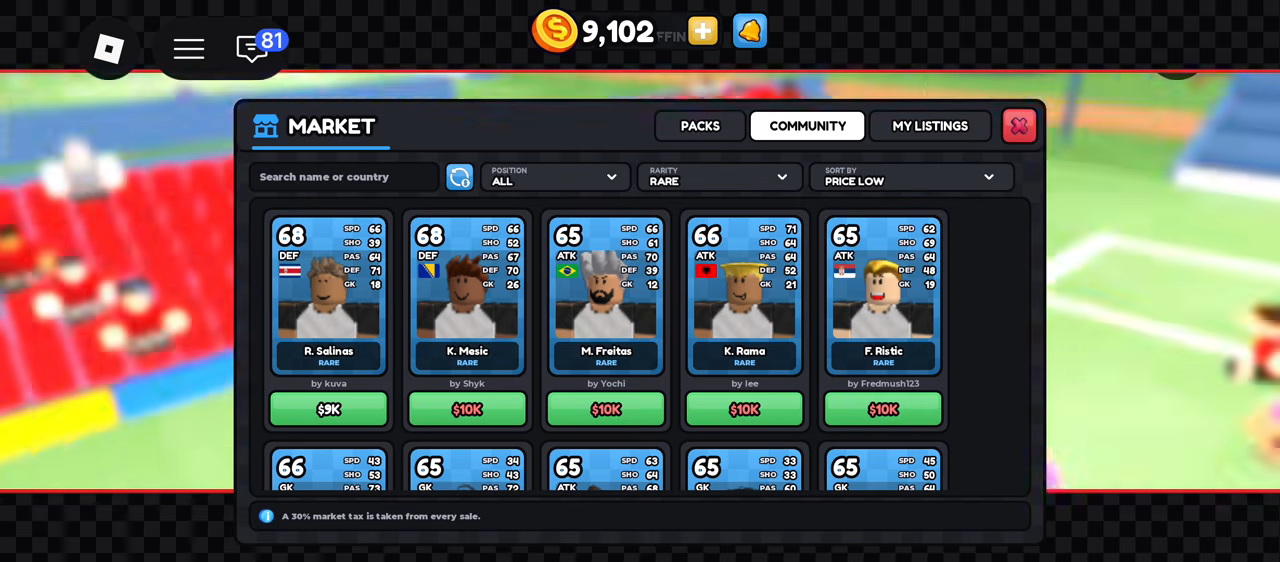
The captured community tab: search box, POSITION and RARITY filters, SORT BY PRICE LOW, and the 30% tax notice along the bottom.
The Community tab is a filtered listing board. A captured screen showed:
- a search box for name or country
- a POSITION filter
- a RARITY filter
- a SORT BY control, set to PRICE LOW in the capture
- listing cards showing overall, position, country, name, rarity, the seller's name and the price
To buy: set the position you need, set rarity to the tier you can afford, sort low, then open a listing and confirm. In the captured session rare cards sat at $8,000 to $10,000, and ICON cards rated 90 to 97 were far higher.
Two failure cases we have not captured: what the game shows when your balance is short, and what happens when someone buys the card while you are looking at it. Expect a confirmation step; do not assume the first tap buys.
The 30% tax
The market screen carries this notice in plain text: "A 30% market tax is taken from every sale."
The sales history confirms it. A sale at $20,000 paid the seller $14,000; a sale at $19,000 paid $13,300.
| Listing price | You receive |
|---|---|
| $5,000 | $3,500 |
| $10,000 | $7,000 |
| $20,000 | $14,000 |
Everything the tax covers is confirmed only for community sales. The market notice is shown on the market screen; the Black Marketer is a different interface, and we have not seen a tax notice there. The Black Marketer page keeps that separate.
MY LISTINGS and SALES HISTORY
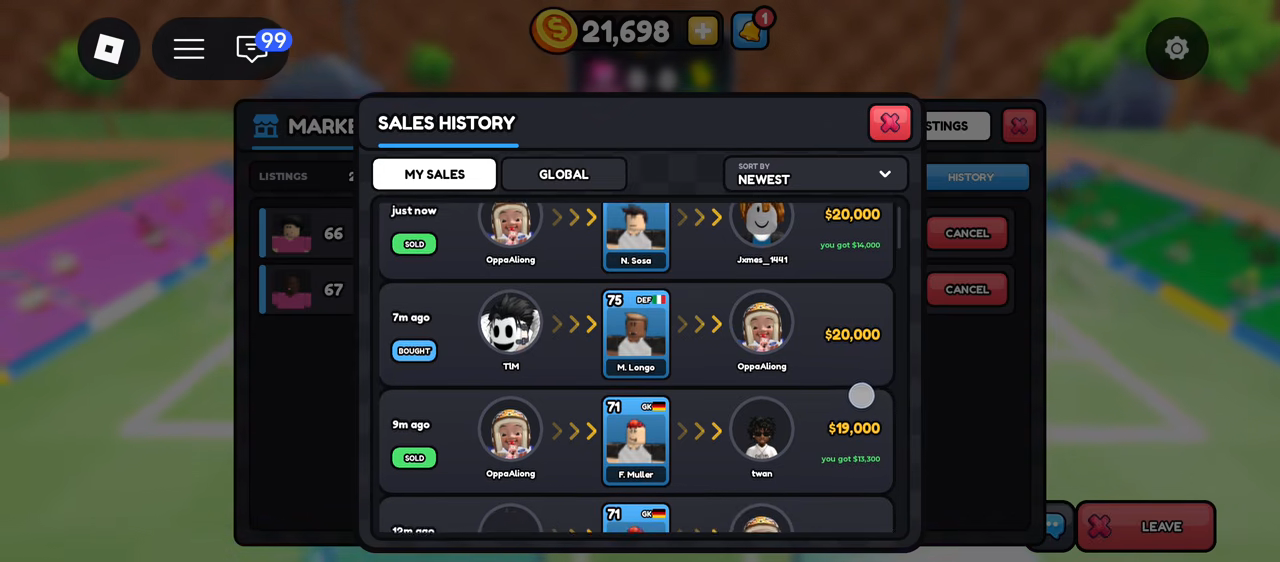
The captured sales history: the headline price on the right, the green "you got" line under it.
MY LISTINGS holds your active offers. SALES HISTORY is the record: it splits into MY SALES and GLOBAL, sorts by newest, and every row shows whether you sold or bought, the price, and — on a sale — a green line reading "you got $…".
Read that green line, not the headline price. It is the only place the game states your actual payout, and it is the fastest way to check whether a card's market value is what you think.
Worked example: buying a defender with $9,102
The captured session had $9,102 in coins and an empty defender slot.
- Open MARKET → COMMUNITY.
- Set POSITION to defender and RARITY to rare.
- Sort by price low. The cheapest defender in the capture was $8,000.
- Buy it: balance falls to about $1,102, and the slot is filled.
If you later sell that same card for $8,000, you receive $5,600 and you are $2,400 down. That is the number the tax notice is warning you about.
Quick sell is not the market
Quick sell lives on the card's detail panel in CARDS, not in the market. It pays immediately, it cannot be undone, and the captured card offered about 7.6K.
Use the trading guide to decide between the three exits — keep, quick sell, list — and the card page for what the stats on a listing mean before you pay for one.